banner


How To Create Incident Task In Servicenow

Incident Management workflows and user tasks

Incident Management enables you to categorize and track various types of incidents (such as service unavailability or performance issues and hardware or software failures), and ensures that incidents are resolved within agreed-on service level targets.

The incident workflow is a sequence of connected steps in the life cycle of an incident. In the workflow, an incident goes through several phases to complete the life cycle.

Incident Management workflow and its phases

Incident management workflow

The following tasks are associated with the Incident Management workflow:

Workflow Phase User Tasks
Logging
  • Create a new incident from a user interaction
  • Create New Incidents from Monitoring System Notifications
  • Review and Update Incident Information
  • Open an incident
Categorization
  • Reassign an Incident
  • Assign an Incident
Investigation
  • Change Incident Status to Pending User Information
  • Change Incident Status to Pending Vendor/Supplier Investigation
  • Document an Existing Solution or Workaround in an Incident
  • Escalate an incident
  • Reassign an incident for additional support
Recovery
  • Test the Incident Resolution
  • Change Incident Resolution
  • Reassign Incident Resolution
Review
  • Reject an Incident Resolution
  • Reject an Incident Resolution with an Associated Change or Service Request
  • Close an Incident
  • Close an Incident with an Associated Interaction or Event
  • Handle complaints
Closure None

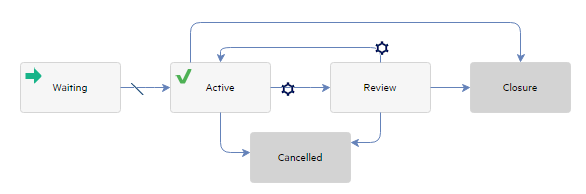
Incident task workflow

Incident task workflow

Workflow phases can consist of one or multiple tasks to be completed to proceed to the next phase. You can use Incident Management tasks to categorize, investigate, resolve, or review an incident.

The following tasks are associated with incident tasks:

Incident Task Phase User Tasks
Waiting Create an incident task
Active None
Review
  • Cancel an opened task for an incident record
  • Close an opened task for an incident record
Closure None
Cancelled None

Note Incident Task can be created by clicking the Link New Task button at any Incident phases except the Logging and Closure phases. All the tasks must be closed before Incident closure.

You need to perform some minimum steps to resolve an out-of- box incident. The following example demonstrates these steps:

Phase: User Actions: Options
Logging
  1. Enter a title in the Title field.
  2. Provide a description of the problem in the Description field.
  3. Click the Fill button and then select an appropriate value to specify the Primary Affected Service field.
  4. If necessary, set the Impact and Urgency fields.
  5. Click Save.
  6. If you want to link an existing incident record, select the incident in the solution candidates and then click Link Selected Record. Otherwise, click Continue to create a new incident.
  • This is the phase that is initiated when an end user Opens a New Problem (Incident Management >Create New Incident)
Categorization
  1. Click the Fill button to specify the Subcategory.

    1. Select an appropriate subcategory.
    2. Select an appropriate area.
  2. Click the Fill button for the Assignment Group, and then select an appropriate assignment group.
  3. Click the Fill button for the Assignee, and then select an appropriate assign person.

  4. Set the Status field to Work In Progress.
  5. Click Save.
Investigation
  1. Enter the Solution field in the Proposed Solution tab.
  2. Click Save.

From the Investigation Phase, you can also move to any of the following:

  • Return to the Categorization Phase.
Recovery
  1. Set the Status field to Resolved.
  2. Click Save.

From the Recovery Phase, you can also move to any of the following:

  • Return to the Investigation Phase.
  • Jump directly to the Closure Phase.
Review
  1. Review the data entered for the Incident.

From the Review Phase, you can also move to any of the following:

  • Return to the Investigation Phase.
Closure
  1. Click Close Button.
  2. Select the appropriate Closure Code.
  3. Click Finish.

Related topics

Incident Management overview

Incident Management workflows and user tasks
Processes and Best Practices

How To Create Incident Task In Servicenow

Source: https://docs.microfocus.com/SM/9.61/Codeless/Content/Codeless_only_content/incident/incident_management_process.htm

Posted by: smithoneten.blogspot.com

0 Response to "How To Create Incident Task In Servicenow"

Post a Comment

Iklan Atas Artikel

Iklan Tengah Artikel 1

Iklan Tengah Artikel 2

Iklan Bawah Artikel